Workspaces
A workspace is the boundary that keeps teams, work, and agent configuration isolated from each other.
A workspace is the boundary for collaboration and data isolation in Clowld Space. Members, issues, topics, agents, skills and run history belong to a workspace.
Company management and workspace access
On deployments with company governance enabled, company roles and workspace roles are separate. CEOs and Directors can create workspaces. Authorized members can manage company workspaces in Company overview, choosing whether to allow requests or require invitations.
Company employees can request access from the workspace directory; workspace owners or administrators review requests. Direct invitations still work. If creation is unavailable, request access or contact an administrator. Visibility depends on deployment configuration and permissions.
What a workspace contains
| Category | Contents |
|---|---|
| Work | Issues, topics, comments, attachments, run history |
| Team | Members, roles, invitations |
| Agents | Agent configuration, skills, runtimes, automations |
| Shared settings | Context, labels, custom properties, integrations |
Context is provided to every agent in the workspace — the place for team background, product conventions, and long-lived requirements. One-off run requirements belong in the corresponding issue.
Create a workspace
Creating a workspace asks for three things:
- Name: shown to members; can be changed later.
- Workspace URL: the slug in the address — the
my-teaminspace.clowld.com/my-team. Lowercase letters, digits, and hyphens only; it cannot collide with an existing workspace or a reserved address, and it cannot be changed after creation. - Issue prefix: pre-filled from the workspace URL and editable before you create — with the prefix
CS, issue numbers appear asCS-1,CS-2, counting up independently within the workspace. Uppercase letters and digits, up to 10 characters; it can be changed later in settings.
The creator automatically becomes an owner.
Change settings
owner and admin can change the name, icon, description, context, and issue prefix; member can only view them.
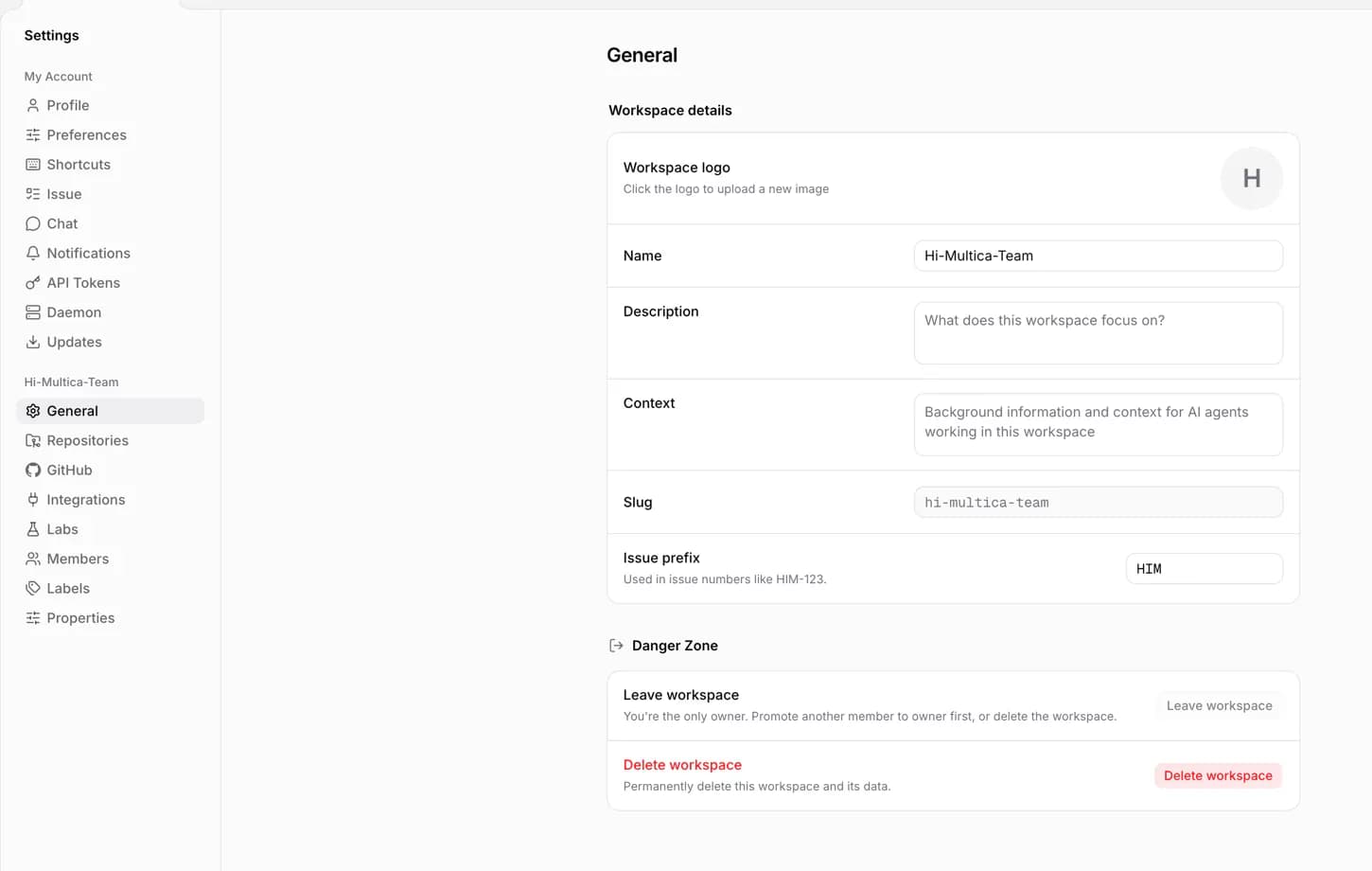
After the issue prefix changes, every issue immediately switches to the new number (CS-5 becomes NEW-5), but the old numbers in PRs, branch names, and chat history do not update.
Switch and leave
One account can join multiple workspaces. Switching only changes what you are currently viewing; it moves no data.
After leaving a workspace, you need a new invitation to return. Leaving also deactivates the runtimes you own, archives the agents bound to them, and cancels their unfinished runs.
The last owner cannot leave; promote another member to owner first.
Delete a workspace
Only an owner can delete a workspace. Deletion permanently removes all of its work, members, agent configuration, and run history, and cannot be undone. If you are only stepping away for a while, leave instead of deleting.
Custom property settings
Workspace owners and admins create fields and choose a type under Settings → Properties; other members can view definitions. Version 1.2.7 adds multiple text values and URLs, with no predefined options, for reference links or free-form lists. Fill in values on the issue.
A property type cannot change after creation; create another field for a different type. Archiving stops new writes while preserving existing values and allowing them to be cleared. If editing is unavailable, check your workspace role or update a client that cannot edit the new types.
Next steps
-
Members and roles — invite members and manage roles.
-
Issues — the basic unit of work in a workspace.
-
Agents — agent identity and configuration.